
Land Rover Defender: Seat Backpack
SEAT BACKPACK - PART NUMBER: VPLES0573
REMOVAL AND INSTALLATION
WARNING: Accessories which are not correctly installed can be dangerous. Read the instructions carefully prior to installation. Comply with instructions at all times. If in doubt, contact your nearest approved retailer.
NOTE: This procedure contains some variation in the illustrations depending on the vehicle specification, but the essential information is always correct.
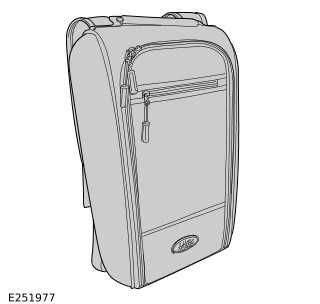
INSTALLATION
1.
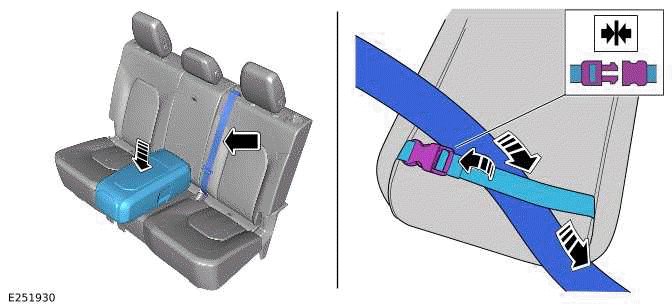
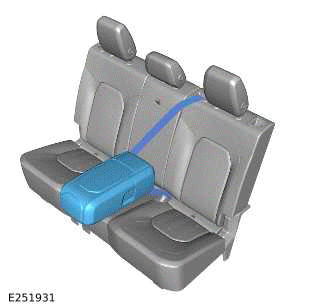
Place the seat backpack in the middle of the second row seats. Strap the seat backpack to the seats by attaching the seat backpack rear strap over the center seatbelt. Engage the second row center seatbelt to the second row center seatbelt buckle.
2.
WARNING: When using the seat backpack on the second row seats the seat backpack must be strapped to the engaged second row center seatbelt.
3.
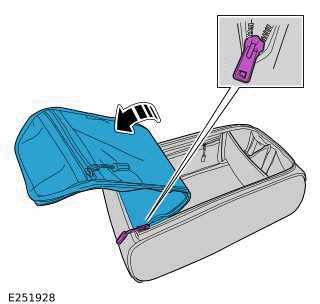
Unzip the front panel to reveal the main compartment.
4.
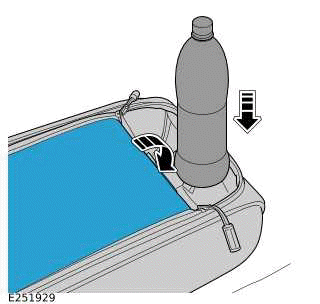
Partially unzip the front panel to use the cup holder section. Tuck the top of the front panel behind the cup holder section.
5.
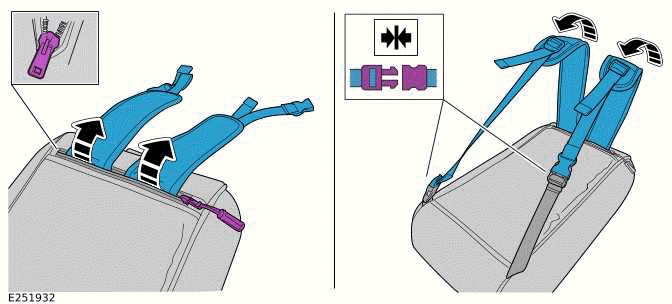
When using the seat backpack outside of the vehicle then follow steps.
- Unzip the top rear section and pull out the shoulder straps.
- Unclip the rear strap and clip each shoulder strap to the adjacent part of the rear strap.
6.
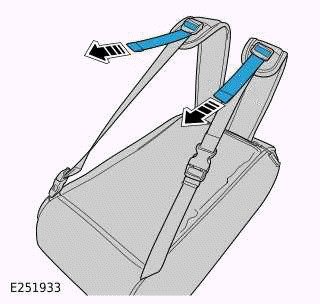
To adjust the straps pull on the part of the strap as illustrated.
READ NEXT:
 Ski Bag
SKI BAG - 110, PART NUMBER: VPLGS0166
REMOVAL AND INSTALLATION
WARNING:
Accessories which are not correctly installed can be dangerous. Read the
instructions carefully prior to
installation. Comply w
Front Treadplates
FRONT TREADPLATES - PART NUMBER: 90:
VPLES0575PVJ, VPLES0595LAA, LR131474,
LR131466, LR131475, LR131467 110: VPLES0576PVJ,
VPLES0596LAA, LR131470, LR141462, LR131471,
LR131463
REMOVAL AND INSTALLATION
Loadspace Treadplate
LOADSPACE TREADPLATE - PART NUMBER:
VPLES0572
REMOVAL AND INSTALLATION
WARNING:
Accessories which are not correctly installed can be dangerous. Read the
instructions carefully prior to
installation.
SEE MORE:
Electric Supercharger To Front Junction Box Cables
REMOVAL AND INSTALLATION
GENERAL EQUIPMENT
REMOVAL
NOTE:
This procedure contains some variation in the illustrations depending
on the vehicle specification, but the
essential information is always correct.
This procedure contains illustrations showing certain components
removed to provide e
Intake Manifold - Ingenium I4 2.0l Petrol
REMOVAL AND INSTALLATION
PART(S)
REMOVAL
CAUTION:
Before disconnecting any components, make sure the area is clean and free from
foreign material. When
disconnected all openings must be sealed.
NOTE:
This procedure contains some variation in the illustrations depending
on the vehicle specifica
