
Land Rover Defender: Controls overview
Land Rover Defender 2020-2026 Owner's Manual / Controls overview
DRIVER CONTROLS
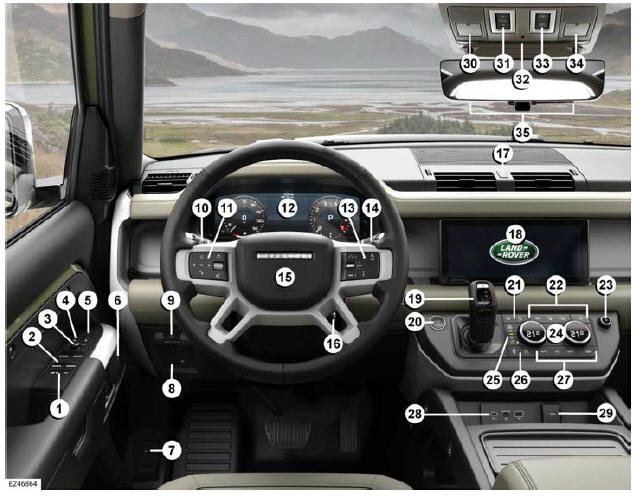
- Rear window isolator and child safety locks
- Window controls
- Mirror adjustment and power-folding mirrors
- Driver's seat position memory
- Clear exit monitor
- Doors lock and unlock
- Hood release lever
- Interior illumination control: Rotate to adjust.
- Electric Parking Brake (EPB)
- Exterior lights and trip computer controls
- Instrument panel menu, audio, phone, and voice controls
- Instrument panel
- Lane Keep Assist (LKA), cruise or adaptive cruise control, heated steering wheel, and speed limiter
- Wash/wipe control
- Horn.
- Steering wheel adjuster
- Hazard warning lights
- Touchscreen
- Gear selector
- Engine START/STOP
- All Terrain Progress Control (ATPC), Hill Descent Control (HDC), and auto stop/start
- Climate control
- Media power button and volume control
- Driving programs and climate control
- Electronic air suspension control
- Dynamic Stability Control (DSC) and low range transfer case
- Climate control
- Portable media connections
- Auxiliary power socket
- Optimized Land Rover assistance
- Sunroof
- Front interior lights
- Sunroof blind
- SOS emergency call
- ClearSight rear-view mirror and garage door opener
READ NEXT:
 Smart key operation
The smart key system uses Radio
Frequency (RF) transmissions that could
interfere with implanted medical
devices. To avoid any possibility of
interference between the system and
the device, make sur
Keyless entry
The smart key system uses Radio
Frequency (RF) transmissions that could
interfere with implanted medical
devices. Make sure that the device is
kept at a safe distance of at least 9 in
(22 cm) away fr
SEE MORE:
Electric Booster Heater - Right Hand Drive
REMOVAL AND INSTALLATION
REMOVAL
NOTES:
This procedure contains some variation in the illustrations depending
on the vehicle specification, but the
essential information is always correct.
This procedure contains illustrations showing certain components
removed to provide extra clarity.
1.
Parking Aid - Specifications, Component Location
SPECIFICATIONS
DESCRIPTION AND OPERATION
COMPONENT LOCATION
COMPONENT LOCATION - 1 OF 3 - PARKING AID - 360º
NOTES:
Right Hand Drive (RHD) vehicle is shown, Left Hand Drive (LHD)
vehicle is similar.
Vehicle with 5 doors is shown, vehicle with 3 doors is similar.
Anti-Lock Brake System Con
© 2010-2026 Copyright www.lrdefender.org
