
Land Rover Defender: Audio steering wheel controls
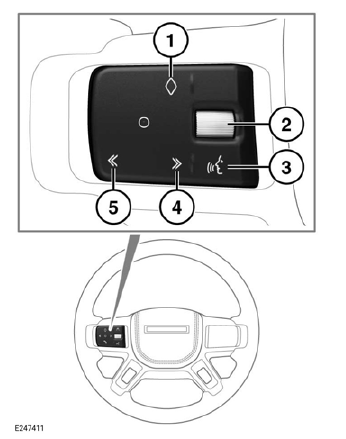

Make sure the relevant safety warnings and cautions have been read and understood before driving the vehicle.
Note: Customization of the audio steering wheel controls can only be performed if the vehicle is stationary and valet mode is exited.
Note: If valet mode has been selected, no customized audio steering wheel selections are available.
Note: When a customized audio steering wheel function is selected, the instrument panel and touchscreen display a notification message.
Note: The favorites icon is set to a factory default setting until a customized function has been stored.
1. Favorites button: Press to operate the stored steering wheel button favorites.
2. Thumbwheel: Rotate upward to increase, or downward to decrease the volume level.
3. Voice button: Press to operate voice control.
4. >> icon:
Press and release to:
- Select the next radio favorite.
- Seek up the frequency to the next radio station.
- Select the next track on the connected portable media source.
- Scroll up lists of calls or contact entries, when the phone is in use.
Press and hold to:
- Fast forward the current playing track, on the connected portable media source.
5. << icon:
Press and release to:
- Select the previous radio favorite.
- Seek down the frequency to the next radio station.
- Select the previous track, or the start of the current track, on the connected portable media source.
- Scroll down lists of calls or contact entries, when the phone is in use.
Press and hold to:
- Rewind the current playing track, on the connected portable media source.
READ NEXT:
 Audio settings
Make sure the relevant safety warnings
and cautions have been read and
understood before driving the vehicle.
To view or alter the audio settings, touch
the settings icon¹ to access the settings
men
Gracenote end user licensing agreement
Gracenote Terms of Use
This application or device contains
software from Gracenote, Inc. of
Emeryville, California ("Gracenote"). The
software from Gracenote (the "Gracenote
Software") enables this ap
AM/FM radio
AM/FM RADIO CONTROLS
Do not adjust the touchscreen controls,
or allow the system to distract the
driver, while the vehicle is moving.
Driver distraction can lead to accidents,
potentially causing s
SEE MORE:
Pairing and connecting using the phone
Make sure the relevant safety warnings
have been read and understood before
operating the phone features.
Note: The process of pairing and
connecting with the vehicle, from the
phone, varies depending on the type of
phone used.
Pairing and connecting a phone for the
first time:
1. Switch the igniti
Steps for determining correct load limit
Make sure the warnings in this topic
have been read and fully understood
before driving the vehicle. Exceeding
the specified load limits could result in
an accident, leading to serious injury or
death.
1. Locate the statement "The combined
weight of occupants and cargo should
never exceed XXX kg o
