
Land Rover Defender: AUTO
The AUTO terrain response setting automatically selects the most appropriate driving program for the prevailing conditions.
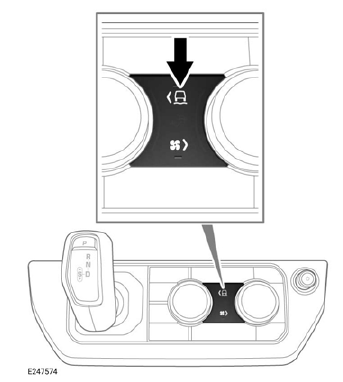
To select the AUTO terrain response setting, press and hold the terrain response button for longer than 2 seconds.
The touchscreen displays a confirmation message to confirm that the AUTO terrain response setting has been selected.
Note: The ECO, wade, dynamic and configurable terrain response driving programs are not selected by the AUTO terrain response setting.
Note: The performance of the AUTO setting is limited if a trailer is connected to the vehicle.
DRIVER OVERRIDE OPTIONS
The terrain response driving programs automatically enable Dynamic Stability Control (DSC). If required, DSC can be manually disabled.
Note: DSC cannot be disabled if the AUTO terrain response setting is selected.
Some terrain response driving programs automatically select Hill Descent Control (HDC). If required, HDC can be manually deselected.
The instrument panel displays the DSC and HDC status.
TERRAIN RESPONSE LIMITATIONS
If the terrain response system develops a system fault:
- The instrument panel displays a warning message.
- The comfort driving program is automatically selected.
- All other driving program icons gray out and are unavailable for selection.
The instrument panel displays a message if the fault was temporary and has since passed. In this instance, the comfort driving program remains active, but the other driving programs become available for selection.
The instrument panel also displays a message if the fault is permanent. Follow the on-screen guidance and contact a retailer/authorized repairer at the earliest opportunity.
READ NEXT:
 Hill Descent Control (HDC)
HILL DESCENT CONTROL (HDC)
Hill Descent Control (HDC) restricts the
vehicle's speed to a set limit when
traveling downhill.
Do not attempt a steep descent if HDC
is inoperative or warning messages ar
Speed limiter safety
Make sure the following warnings have
been read and fully understood before
using a speed limiter. Failure to use the
speed limiter safely could result in an
accident, leading to serious injury or
dea
SEE MORE:
Anti-Theft - Passive - Operation
PASSIVE START SYSTEM
The RFA prompts each of the internal LF antennas to output a signal. When the
smart key is in the passenger
compartment, the smart key detects the LF signals. The smart key responds with a
data identification signal back to
the RF receiver. The RF receiver sends the data ident
High/Low-Pressure Fuel System Bleeding
High-Pressure Fuel System Bleeding
GENERAL PROCEDURES
WARNING:
Avoid flames, sparks or lighted substances.
CAUTION:
This procedure is necessary if any of the following fuel system components
are removed, disconnected or
replaced:
High pressure fuel pump
High pressure fuel lines
Fuel injectors
