
Land Rover Defender: Vehicle labels
LABEL LOCATIONS
 Warning labels attached to the
vehicle bearing this symbol
mean: Do not touch or adjust
components until having read
the relevant instructions in the
handbook.
Warning labels attached to the
vehicle bearing this symbol
mean: Do not touch or adjust
components until having read
the relevant instructions in the
handbook.
 Labels showing this symbol
indicate that the ignition system
utilises very high voltages. Do
not touch any ignition
components while the ignition
is switched on.
Labels showing this symbol
indicate that the ignition system
utilises very high voltages. Do
not touch any ignition
components while the ignition
is switched on.
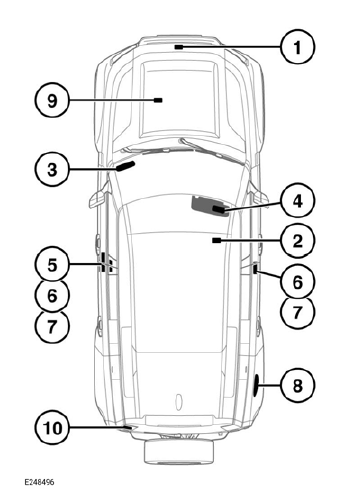
- Hood locking platform: Air Conditioning (A/C) label.
- Top of the battery: Battery warning symbols.
- The Vehicle Identification Number
(VIN) is etched onto a label, visible
through the lowest part of the right
side of the windscreen. The number is
also stamped into the right-side
suspension tower.
Note: The VIN number may be requested by the retailer/authorized repairer.
Note: The vehicle's built date is shown on the tire pressure label. The builtdate is the calendar month and year in which the body and powertrain assemblies were conjoined and the vehicle was driven from the production line.
- Passenger side sun visor: Air bag label, vehicle handling label.
- B pillar: VIN certification label, containing the certified vehicle weights.
- B pillar or inside base of the front door: Tire pressure label and placard.
- B pillar: Air bag warning label.
- Inside the fuel filler flap: Fuel label.
- Engine number: Inlet manifold.
- Rear taildoor warning information.
It is important to be familiar with these subjects, to make sure that the vehicle and its features are used safely.
READ NEXT:
 Using the passport to service
YOUR PASSPORT TO SERVICE
This section of the Owner's Handbook
contains information essential for the
understanding of your vehicle warranties,
and for the implementation of any
necessary warranty rect
Foreword
LAND ROVER ROADSIDE ASSISTANCE
We are committed to providing high levels
of owner satisfaction and to offering you
the highest standard of owner care. Jaguar
Land Rover (JLR) is pleased to welcome
you
SEE MORE:
Wiring Harness - Approved Probing and Repair Methods, Electrical Connector
Probing
APPROVED PROBING AND REPAIR METHODS
The purpose of this document is to identify the approved methods to promote
an effective and efficient diagnosis and
minor repair to the:
Permitted electrical wiring harnesses, connectors and cables
See Electrical Wiring Harness Repair.
Media Oriented S
Roof Opening Panel Alignment
GENERAL PROCEDURES
CHECK
NOTES:
This procedure contains some variation in the illustrations depending
on the vehicle specification, but the
essential information is always correct.
This procedure contains illustrations showing certain components
removed to provide extra clarity.
1.
NOTE:
T
